
Reconcile Stripe payments and fees for music tuition
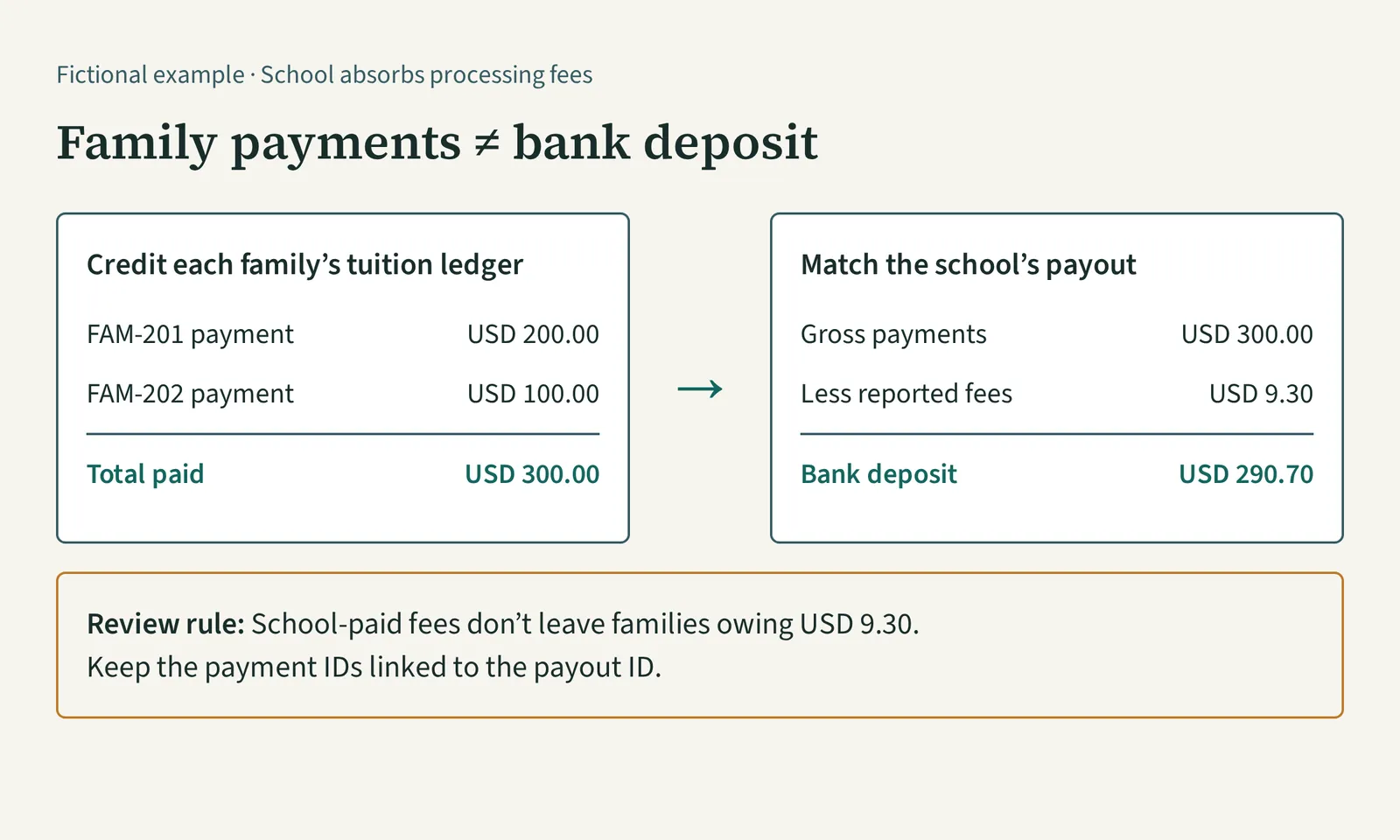
To reconcile Stripe payments and processing fees for music tuition, match each family’s payment to its tuition account, then match the payout’s underlying transactions to the bank deposit. When your school absorbs the fee, the family’s payment is the full tuition amount paid—not the smaller amount deposited. Keep those two checks separate so a processing cost doesn’t become an unexplained family balance.
How do you reconcile Stripe payments and fees?
A gross payment is the amount collected before processor deductions. A net payment amount is what remains after the deductions attached to that transaction; a payout is a transfer to your bank that can include several payments and other movements.
Use the payment record to answer “What did this family pay?” Use the payout detail to answer “What made up this bank deposit?” A single deposit amount usually cannot answer both questions.
For music-school spreadsheets, keep two linked tables:
| Table | One row represents | Fields to keep |
|---|---|---|
| Family receipts | One successful payment | Family ID, payment ID, payment date, tuition amount paid, currency, invoice reference |
| Settlement detail | One processor balance movement | Transaction ID, linked payment ID where applicable, payout ID, gross amount, fee, net amount, currency |
Keep the downloaded source reports unchanged. Link working rows by transaction references rather than by equal amounts alone. The music-school tuition spreadsheet layout explains how family receipts connect to charges and opening balances.
Two family payments can create one smaller deposit
Consider this fictional example: on 10 Nov 2026, FAM-201 pays a USD 200.00 tuition invoice and FAM-202 pays a USD 100.00 tuition invoice. Your school absorbs processing fees. The processor report shows the following amounts, with both transactions assigned to payout PAYOUT-301, deposited on 13 Nov 2026.
| Payment reference | Family payment | Reported fee | Net amount |
|---|---|---|---|
| PAY-201 · FAM-201 | USD 200.00 | USD 6.10 | USD 193.90 |
| PAY-202 · FAM-202 | USD 100.00 | USD 3.20 | USD 96.80 |
| Total | USD 300.00 | USD 9.30 | USD 290.70 |
These fees are example report values, not a rate to apply to your school. Use the actual deductions in your processor records.
The bank check is USD 300.00 − USD 9.30 = USD 290.70. The family checks are separate: FAM-201’s USD 200.00 payment clears its USD 200.00 invoice, and FAM-202’s USD 100.00 payment clears its USD 100.00 invoice, assuming neither account has other movements.
If you enter only USD 193.90 and USD 96.80 as family receipts, you manufacture amounts owed of USD 6.10 and USD 3.20. The families paid their tuition; the difference is the school’s processing cost. Nova’s music-school fee guidance describes this school-absorbed setup: the family pays the invoice amount and the fee is deducted before the deposit.
Download the transactions behind an automatic payout
Stripe’s Payout reconciliation report documentation, reviewed in November 2026, gives this sequence:
- Open the Payout reconciliation report in Stripe.
- Select a date range covering the payout’s estimated arrival date. Widen it if you’re unsure of the date.
- Find the payout in the Payout reconciliation section.
- Download its Itemized CSV, which includes the payments, refunds, disputes, fees and other balance transactions behind the payout.
- Match the payout reference and amount to the bank entry, then trace the relevant payment references back to your family receipts.
Use the itemized download rather than only the summary when you need to identify which family’s payment or refund is included. Stripe groups this report by estimated arrival date, which can differ from the bank’s posting date.
Choose the report for your payout method. Stripe’s payout report is designed for automatic payouts; its documentation directs ordinary manual-payout users to the Balance report. Stripe also says it cannot identify the transactions included in instant payouts, so those require reconciliation against transaction history.
A month-end payment may still be waiting for payout
Keep a family payment’s date separate from the bank deposit date. Otherwise, changing months can make a genuine receipt appear missing—or tempt you to enter it again when the deposit arrives.
Continuing the example, FAM-203 pays USD 150.00 on 30 Nov 2026. Its reported fee is USD 4.65, leaving USD 145.35 that remains unsettled at the November cutoff and reaches the bank on 2 Dec 2026.
If your operational tuition ledger includes successful payments dated through 30 Nov 2026, record the USD 150.00 family receipt in November. Carry the USD 145.35 as an identified unsettled processor amount in your settlement check. In December, match the deposit to that existing payment; don’t create another USD 150.00 family receipt.
Stripe’s Ending balance reconciliation section identifies transactions that had not settled by the report’s end date. Use that detail to explain the cutoff difference rather than forcing November family payments to equal November bank deposits.
Resolve these differences before approving the totals
- A payout includes a refund or dispute. Include the relevant movement in the settlement check and review its linked family record. A smaller deposit alone does not establish that tuition is unpaid. For an approved return of prepaid credit, follow the refund-recording example.
- A fee appears separately or later. Look for the related transaction reference. Stripe’s Fees report guidance explains how to find fees by transaction ID, including standalone fees and tax on fees.
- The family paid an added fee. Separate the tuition portion from the additional amount using the invoice and payment detail. Don’t treat the whole collected amount as prepaid lesson credit.
- A payment appears in both a receipt export and payout detail. Use payout detail to match the existing receipt, not to add another family payment. The duplicate-payment guide shows how to verify repeated rows without deleting genuine transfers.
- The currencies differ. Reconcile each currency separately and use the processor’s reported conversion details. Don’t subtract amounts in different currencies as though they were the same money.
Save the receipt-to-family matches, payout detail, bank reference and unresolved-item list together. Your bookkeeper or accountant should confirm the expense, tax and financial-reporting treatment for your school; the operational checks above explain who paid and where the money went.